Caitlin Script: Elegant Handwritten Font
There I was, staring at a blank brand board, trying to figure out how to bring a client’s vision to life. They wanted something soft, personal, and a little whimsical—perfect for their new artisanal skincare line. After testing a few options, I landed on Caitlin Script. It felt right from the start.
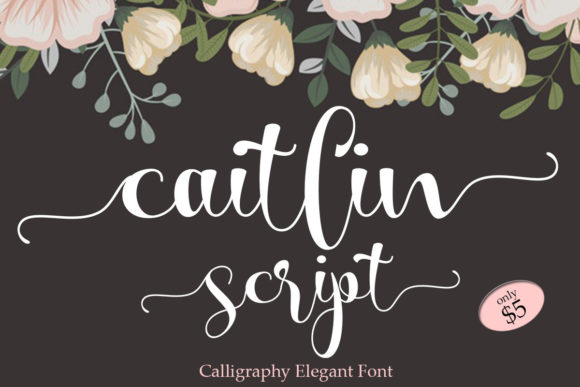
Caitlin Script is an elegant and dainty handwritten font that features sweet and delicate swashes. Its personality is gentle, almost like a whispered secret. The font has a natural flow that makes it feel handcrafted, which fits well with brands looking to convey authenticity and care.
Visual Characteristics and Personality
The first thing I noticed about Caitlin Script was its balance between simplicity and detail. The strokes are light but defined, and the swashes add a touch of sophistication without being overwhelming. It’s not too ornate, which means it can work in a variety of design contexts without feeling cluttered.
I tested it on a logo draft, and it immediately gave the brand a sense of warmth. The font’s softness contrasted nicely with a clean sans serif for the tagline, creating a visual hierarchy that felt both modern and approachable. It didn’t overpower the design, but it definitely added character.
Real-World Design Applications
As I moved into packaging design, Caitlin Script proved to be versatile. On product labels, it added a personal touch that made the items feel more handmade. I used it for the product names, while a bolder typeface handled the descriptions. This combination created a clear visual structure while maintaining a cohesive brand identity.
On social media graphics, Caitlin Script worked well as a headline font. It caught the eye without being too flashy. I paired it with a simple sans serif for captions, which helped maintain readability across different platforms. The font also looked great in Instagram posts, especially when used for quotes or short messages.
When designing a flyer for a local event, I used Caitlin Script for the main title. It gave the design a friendly, inviting feel that matched the event’s vibe. I made sure to test it at different sizes to ensure it remained legible, and it held up well even at smaller sizes.
Font Usability and Technical Features
Caitlin Script is PUA encoded, which means all glyphs and swashes are easily accessible. This is a huge plus for designers who want to customize their typography without extra steps. I found it straightforward to use in Adobe Illustrator and Photoshop, and the font’s file format made it easy to integrate into different projects.
One thing to note is that Caitlin Script works best as a display or headline font. It’s not ideal for long paragraphs, but it shines when used sparingly. For branding projects, I recommend using it for logos, headings, and accents rather than body text.
Design Pairing and Recommendations
When pairing Caitlin Script with other fonts, I found that it pairs well with both serif and sans serif typefaces. A classic serif like Playfair Display or a clean sans like Lato creates a nice contrast while keeping the design balanced. For a more modern look, pairing it with a geometric sans serif like Montserrat can give a fresh, contemporary edge.
I also experimented with using it alongside another script font for a more layered effect. However, I found that using two script fonts together can sometimes feel busy. It’s better to use one script font as a focal point and pair it with a simpler typeface for the rest of the design.
For clients, I always recommend testing the font in different contexts before finalizing a design. Print samples, digital mockups, and real-life applications can all reveal how the font performs in various scenarios. This helps avoid surprises later on.
Practical Advice for Designers
If you’re working on a branding project, consider how Caitlin Script will fit into the overall visual language. Will it be used for logos, packaging, or web headers? Understanding the font’s strengths and limitations will help you make better design decisions.
Another tip is to explore the font’s alternates and ligatures. These small details can make a big difference in how the font looks in different applications. For example, using a specific ligature can create a more polished appearance in a logo or heading.
When working with clients, I often explain the importance of font choice in shaping brand perception. Caitlin Script, with its soft and elegant style, can help communicate a brand’s values effectively. It’s a great tool for businesses that want to appear thoughtful, creative, and authentic.
Overall, Caitlin Script is a valuable addition to any designer’s toolkit. Its elegance and versatility make it suitable for a wide range of projects, from small business branding to editorial design. Whether you’re working on a café menu, a skincare label, or a website header, this font can add a touch of personality that resonates with your audience.